Sunday, July 14, 2013

Sunday Story

One today because it was we'd had dinner at Grandma and Grandpa's and there is Kindy tomorrow.  Well officially it was because they didn't get dressed before the timer went. One of the library books:

Polar Opposites by Erik Brooks.


I liked this one because it part of the plot was that Polar Bears and Penguins live at different poles.  It makes me happy when childrens books don't enforce those common fallacies that get drummed into peoples heads - like dinosaurs and humans at the same time, polar bears and penguins playing together etc.  One might say it's just a children's story but I think there is a difference between talking chickens and telling children that  octopuses have 9 babies through a live birth rather than laying hundreds of eggs. (recent cartoon bugbear).  I'm ok with fairies and Santa and gnomes in stories but I'm not ok with polar bears and penguins living at the north pole together.  So I like this book.

Saturday, July 13, 2013

Saturday Stories

After an exciting day where they attended a mermaid birthday party with a spectacular mermaid cake, we started the new library books with a fairy day.

The A to Z of Fairies by Caroline Stills


The Very Fairy Princess Follows Her Heart by Julie Andrews and Emma Walton Hamilton


The girls are so young they don't even know who Julie Andrews IS.


Friday, July 12, 2013

Friday Story

Thomas the Tank Engine story 2 for Rosie.
And for Callie after much deliberation and a "Mummy has already read that one" about another book - we get a different book which I read last week:

The Kangaroo Who Couldn't Hop by Robert Cox and Jim Robins


I don't think the girls get the punch line.  That one is either a hand me down or a life line book sale.

Tomorrow we might start the new crop of library books.


Thursday, July 11, 2013

Thursday Story

Tomorrow is a busy day so the girls got one story so they'd get to bed quicker.
I got to choose (because it was only one story).  I chose This is My Book by Mick Inkpen


I love this book - the Snapdragon eats parts of letters and the dots off the "i"s :-)

Wednesday, July 10, 2013

Wednesday Bedtime Stories

Tonight I dissuaded Callie from having the Opera book she got at the lifeline book sale by saying it wasn't a story book.
Instead we had for Callie:
Little Princess: I Want My New Shoes! by Tony Ross


And for Rosie the first of the stories in the Thomas the Tank Engine Trouble on the Tracks
train tracks book she got from the Life Line book sale. (missing its train) (it was from the $2 section).


It sounds like all their books are from the life line book sale but we're still working our way through the ones they got a month ago.  They had a library period in the middle and now they've been finding things on their own shelves.

Tuesday, July 09, 2013

Tuesday Bedtime Stories

Tonight stories for two tired children:

The Little Ballerina by Sue Harris


Which Rosie got for her birthday from her Aunty Susan last year (I think).
It's got little envelopes with fold out cards in - and only one card is missing...

The first part of a disney Beauty and the Beast book which was either a hand me down or a lifeline book sale.  After visiting the lifeline book sale with my daughters and seeing which books they would choose I understood why we got so many disney and pink shiny books as hand me downs from my nieces. 

Monday, July 08, 2013

Bed Time Stories

The Girls said that they couldn't remember what day they last read a particular story.  I suggested we could write down what books we read.

Tonight:

What Planet Are You From Clarice Bean by Lauren Child 

Which we got at the lifeline book sale and I hadn't read before.  I enjoyed it but I think as it's about a 9 or 10 year old was probably a bit old for the girls.  They were yawning a bit - so they weren't really engaged.


Time, Ted and the Pirates by Ian Whybrow and Russell Ayto
Which was a hand me down from my sister and we read ocassionally.
Which is ok and rhymes - plus it has PIRATES and a Shark that has swallowed a large convertible car and what appears to be a train carriage.

Monday, March 11, 2013

Bees in our Backyard

The friday before last bees moved into our backyard. They are living in a tree.  When it rains some fall out of the tree.


Bees FLY


Bees Dance

A Bee Dance is like a Map


Bees Live Together - in Hives or Trees


Bees Visit Flowers


Bees Make Honey - BEE SPIT


Butterflies in our Backyard

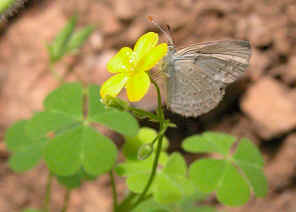
We think we have caught a Common Grass Blue Butterfly
(Zizina labradus of the family LYCAENIDAE order Lepidoptera)

It was in our garden.

Butterflies:

Visit Flowers and drink Nectar

Butterflies Have Scales Like Fish

Butterfly scales:


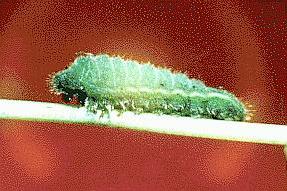
 Caterpillars turn into Buttterflies


Butterflies Fly


Saturday, March 02, 2013

Bees

A swarm of bees has decided that our backyard is their rainy weather holiday resort. Yesterday noticed a loud buzzing noise. I attributed this to my mildly blocked ears. Then Sven called "hey look a swarm of bees". There were lots of angry looking bees flying around each other. Then it began to rain. Now they have installed themselves on a tree branch 5 metres up. They've been there all night. They're very high up and I'm hoping they'll decide to move when it stops raining - bees are nice in the abstract but my vision of hundreds of touchy bees living in my backyard is not pretty.

Thursday, September 16, 2010

Child rearing Advice

I have a new piece of wisdom for parents of young children that I haven't read anywhere else.
When your young toddler first starts using duplo - until you're used to it being spread everywhere wearing footwear is a sensible safety precaution :-)

I'm using those slippers they told me to get for the hospital when I had the twins - it helps that my toes are cold :-)

Tuesday, September 14, 2010

Buildbot windows service

I run buildbot and have a slave on windows. The buildbot is installed a service. The box was moved from one network to another a few days ago and the buildbot service would no longer start up.
In the original network the box was connected to a domain server. In the second network it wasn't.

In the original network, the username was part of the domain. When the box was moved I added a local account for the box. On another box which had the same move it didn't have a problem.

When I tried to start the service a dialog popped up: "The Dependency Service or Group Failed to Start". In the event viewer was a message saying that the service depended on the netlogon service and the netlogon service was not started. The netlogon service said it didn't need to run because it was part of a work group.

After a while I guessed that the service authentication in the dialog was done through the netlogon service because it was a domain user name. So I:
removed the service.
rebooted the box (so the service would delete.
added the service again.

And it WORKED!!!!

Tuesday, November 24, 2009

Best Quote from a Review Ever

In The Village Voice Chuck Wilson reviews 2012 with this wonderful beginning:

Completing his multi-film vendetta against the world's tourist trade, German-born director Roland Emmerich sends the mother of all storms to level the Washington Monument, the Eiffel Tower, ...


http://www.villagevoice.com/2009-11-10/film/the-end-is-near-in-emmerich-s-2012/

Friday, November 13, 2009

Sitting Up

The twins are 7 1/2 months old and Rosie sat up twice this morning. Mum and Dad were watching the girls - so I haven't seen this momentous feat yet. They're almost crawling too! Sleeping in their sleeping bags. Eating three meals a day. Oh - and very cute.

Saturday, September 12, 2009

First Solids

Yesterday, the twins had their first solids. They had a tiny bit of farex (rice cereal) mixed with formula. I put a baby spoon in front of Rosie and she tasted it. Her face was a mixture of horror and fascination :-) Sven tried feeding Callie - rather than giving her a taste. She pushed most back out again. I suppose we'll try again today after lunch and see if there is more interest. They're 5 1/2 months so if they don't get interested in a few days we'll stop again and try again in a few weeks.

Thursday, September 10, 2009

Rosie and Callie

Since I last posted we've had twin girls - Rosie and Callie. They are 5 months old now. Today Rosie put her foot in her mouth for the first time - developmental milestone - tick.
They are both sticking they're feet in the air in a v shape, grabbing their ankles and tipping over to the side. Rosie started first. Both now swivel when put down on the play mat.

Friday, March 13, 2009

Linux and the Treo

I got a new notebook a while ago and put debian on it. While I had my treo running on my old notebook running debian without a problem I couldn't get my new notebook to synch using jpilot or any of the other standards. I just tried again and now I know what I was doing wrong.

I had jpilot and pilot-link etc and I'm running the 2.6.28-1 amd 64 debian standard linux kernel. Each time I would press the hotsync button on my palm, I'd get something like

[245227.264134] usb 6-1: USB disconnect, address 9
[245228.000084] usb 6-1: new full speed USB device using uhci_hcd and address 10
[245228.166546] usb 6-1: configuration #1 chosen from 1 choice
[245228.171749] usb 6-1: New USB device found, idVendor=0830, idProduct=0061
[245228.171755] usb 6-1: New USB device strings: Mfr=1, Product=2, SerialNumber=5
[245228.171761] usb 6-1: Product: Palm Handheld
[245228.171764] usb 6-1: Manufacturer: Palm, Inc.
[245228.171768] usb 6-1: SerialNumber: PalmSN12345678


And if I hotsynched again then the address would go up by 1. The instructions I found told me to select a /tty/usb? device with jpilot.

Today I found that I'm supposed to use usb:

Then it works fine :-) I don't know whether this option wasn't there last time I tried it with earlier versions of the kernel or whether I just found really old howto documents. Anyway now it's on this blog next time I forget I can find the answer...

Thursday, January 01, 2009

Twinhan Remote, Lirc and Freevo or How I spent my holidays

Ok Not all my holidays... We went home for a family Christmas and when I came back I decided to put the livepause plugin for our Freevo box. I'm spending a lot of time in a chair at the moment and it gave me something entertaining to play with.

Livepause Plugin

I followed the installation instructions on the freevo plugin page. Downloaded dvbstreamer, followed instructions, changed my freevo start up script (running debian) so that it started dvbstreamer and stopped it when I started and stopped freevo and I could pause live tv. Worked very well - thanks live pause writer :-)

Had to do a few tweaks:
- had to create the path to the buffer directory eg /tmp/freevo before starting freevo. Discovered that it would disappear on a reboot so I moved it to my /data directory.
- Looking in the log each time was very useful because it would show why it was failing eg typo, dvbstreamer not started, dvb card not released from last run etc.
- The instructions from the next section on the old dvbstreamer was useful too because it contained information on starting dvbstreamer etc.


All was not perfect in the livepause garden unfortunately. Key control was obviously coming from whatever player I was using and no keystrokes were getting to freevo which would allow me to rewind and fastforward, record and other funky features implemented by the kind livepause implementer.

After much fiddling around and searching I found a post which explained my problem. We are using our video through x11. This means that when we have mplayer, vlc or xine playing, they have the window focus and all commands are passed directly to them. Freevo is not being passed keystrokes.
There is a -win command for mplayer used by the mozilla plugin that could get around this (must explore).

A way for us to avoid this was to use a remote control with lirc. Happily we happened to have one handy so we could try it out. So I had to setup a twinhan remote control with lirc. This took several attempts.

Twinhan Remote and Lirc

The Twinhan remote control we have has a usb connector on the ir receiver. This is picked up as a keyboard and mouse event devices.

lsusb output:

Bus 003 Device 002: ID 6253:0100 TwinHan Technology Co., Ltd Ir reciver f. remote control


dmesg output

[ 6.465970] input: Twinhan Tech Remote Control as /class/input/input1
[ 6.487824] input,hidraw0: USB HID v1.10 Keyboard [Twinhan Tech Remote Control] on usb-0000:00:1a.2-2
[ 6.508907] input: Twinhan Tech Remote Control as /class/input/input2
[ 6.520802] input,hidraw1: USB HID v1.10 Mouse [Twinhan Tech Remote Control] on usb-0000:00:1a.2-2


When you plug it in it acts like a keyboard so you could just map the keys - except the ones that are more than one character and will not be passed into X. We needed lirc input to bypass the keyboard layer - this took my a while to put all the steps together. I don't know why what worked perfectly for other people did not work for me but I finally got it going :-)


I followed step 1 of these useful instructions from Adam Pierce. I installed his lircd.conf file and edited by hardward.conf file to include his settings etc.

This did not work - the twinhan remote is a usb device and it was still being intercepted as a keyboard.

I learnt that the lirc test program irw by default looks for a /dev/lircd and /dev/lirc. With usb devices the /dev/lirc is not created as it uses a link to the /dev/input event device created for the keyboard handler. When your run irw with no commands the first time it will kill your lircd and the second time you run it you will get

connection refused


I tried various other techniques which all failed.

Then I found this in the faq:

Start the daemon this way:
/usr/sbin/lircd -H dev/input -d /dev/input/eventn.


I modified it to use my device by id instead of the event which will keep changing.

lircd -H dev/input -d /dev/input/by-id/usb-Twinhan_Tech_Remote_Control_1111111-event-kbd


This gave me an irw that was displaying the keystrokes for everything but the power button.

I run debian and found what I needed to do to get the /etc/init.d/lirc start up file to use the settings from the hardware.conf file was to change the settings for the /etc/lirc/hardware.conf file from

REMOTE_DRIVER="devinput"
REMOTE_DEVCE="/dev/input/by-id/usb-Twinhan_Tech_Remote_Control_1111111-event-kbd"


which is what Adam Pierce had to

DRIVER="dev/input"
DEVCE="/dev/input/by-id/usb-Twinhan_Tech_Remote_Control_1111111-event-kbd"


Then I could start up automatically using
/etc/init.d/lirc start


On Adam Pierce's earlier version of his instructions a helpful poster had recommended adding this to the /etc/lirc/lircd.conf file to add the power button:

POWER 0×1001d


So I added it and it worked fine.

Now on to the freevo setup.

Wednesday, November 19, 2008

Nextwiki has new name

The TWiki fork has now decided on a name. They have decided on Foswiki. This is the most popular AND least hated of the names they'd decided to select from. Getting both of these is pretty impressive :-)

It's not the most scintillating name but it will not be embarrassing to mention to my managers so it meets my major wish list.

Sunday, November 02, 2008

x10 Automation and the cm15a

Haven't played with misterhouse for a while and since the last time we did, we upgraded the kernel on our freevo misterhouse media box.

Tried to turn on a light for a while and released that as we're using the usb cm15a as our pc interface, I needed to rebuild the module. Look at my last blog notes and found that they really weren't detailed enough for me to remember how it all worked. Bad bristley - should take better notes.

Searching google based on the sparse clues I'd left myself I found this useful post on the cm15a with the generic usb driver.

So a synopsis in case it disappears or I'm too lazy to look it up next time.

Doing cat /proc/bus/usb/devices shows me that I have the x10 usb device there but no driver.

T: Bus=01 Lev=01 Prnt=01 Port=01 Cnt=02 Dev#= 4 Spd=1.5 MxCh= 0
D: Ver= 1.10 Cls=00(>ifc ) Sub=00 Prot=00 MxPS= 8 #Cfgs= 1
P: Vendor=0bc7 ProdID=0001 Rev= 1.00
S: Manufacturer=X10 Wireless Technology Inc
S: Product=USB ActiveHome Interface
C:* #Ifs= 1 Cfg#= 1 Atr=c0 MxPwr= 2mA
I:* If#= 0 Alt= 0 #EPs= 2 Cls=00(>ifc ) Sub=00 Prot=00 Driver=(none)
E: Ad=81(I) Atr=03(Int.) MxPS= 8 Ivl=10ms
E: Ad=02(O) Atr=03(Int.) MxPS= 8 Ivl=10ms


I already had the iplc driver code from this page sitting in my home directory from last time. I had already modified the code to work with the latest 2.6 kernels as recommended on the instruction page. I installed the kernel headers and kernel source (apt-get - I love Debian).

Then I built the cm15a driver - this is the bit I'd forgotten. I tried make -f Makefile.cm15a but what you're supposed to do is

make cm15a


This built the driver for me in /root/iplc/driver/linux-2.6/cm15a.d/cm15a.ko
From the cm15a.d directory I ran
insmod cm15a.ko


And then my at cat /proc/bus/usb/devices showed

T: Bus=01 Lev=01 Prnt=01 Port=01 Cnt=02 Dev#= 4 Spd=1.5 MxCh= 0
D: Ver= 1.10 Cls=00(>ifc ) Sub=00 Prot=00 MxPS= 8 #Cfgs= 1
P: Vendor=0bc7 ProdID=0001 Rev= 1.00
S: Manufacturer=X10 Wireless Technology Inc
S: Product=USB ActiveHome Interface
C:* #Ifs= 1 Cfg#= 1 Atr=c0 MxPwr= 2mA
I:* If#= 0 Alt= 0 #EPs= 2 Cls=00(>ifc ) Sub=00 Prot=00 Driver=cm15a
E: Ad=81(I) Atr=03(Int.) MxPS= 8 Ivl=10ms
E: Ad=02(O) Atr=03(Int.) MxPS= 8 Ivl=10ms


Note that Driver on the I line now says cm15a. And there is now a /dev/cm15a0 device.